




通过阅读本文档,可以快速了解 HTML 组件的适用场景和使用方法。
关于 HTML 组件
HTML 组件是支持通过「HTML 语法」定制个性化展示界面的一种标准页面组件,具有在线编辑、实时预览、轻量便捷的特点。
目前 HTML 组件可在页面搭建中直接拖入使用。
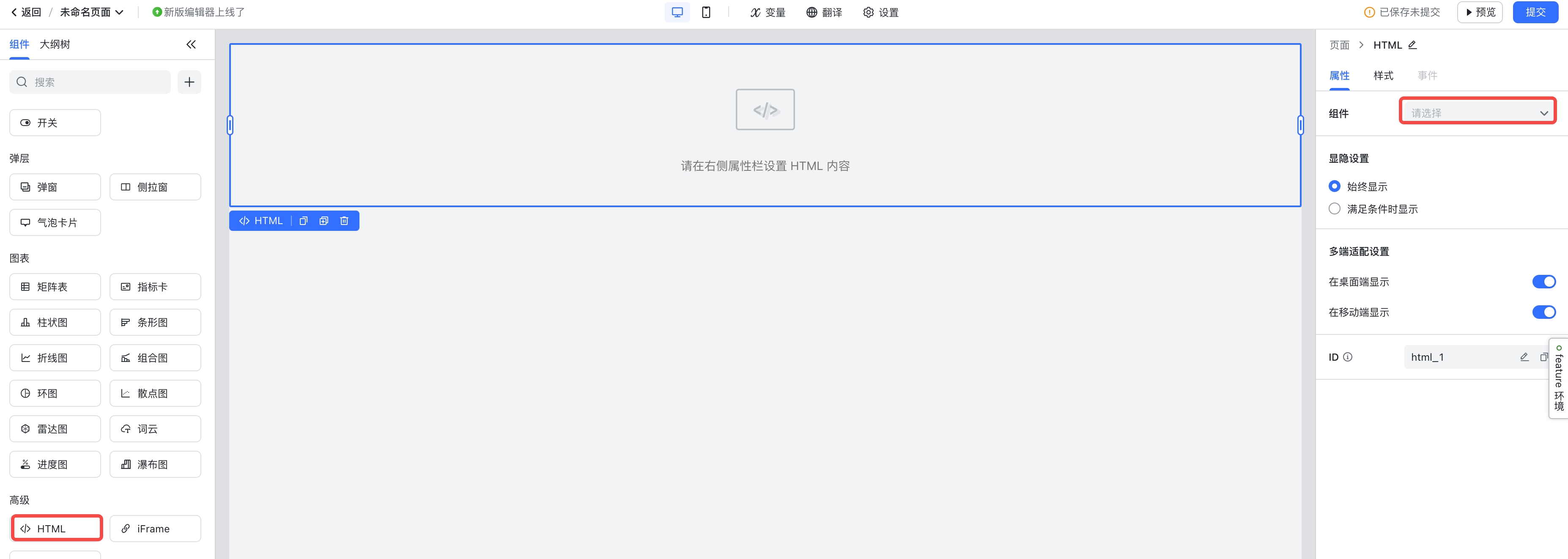
250px|700px|reset
适用场景
HTML 组件适合开发轻交互重展示的前端展示界面,通过 HTML 组件,可以实现类似这样的页面元素:
- 轮播图

250px|700px|reset
- 跳动的爱心
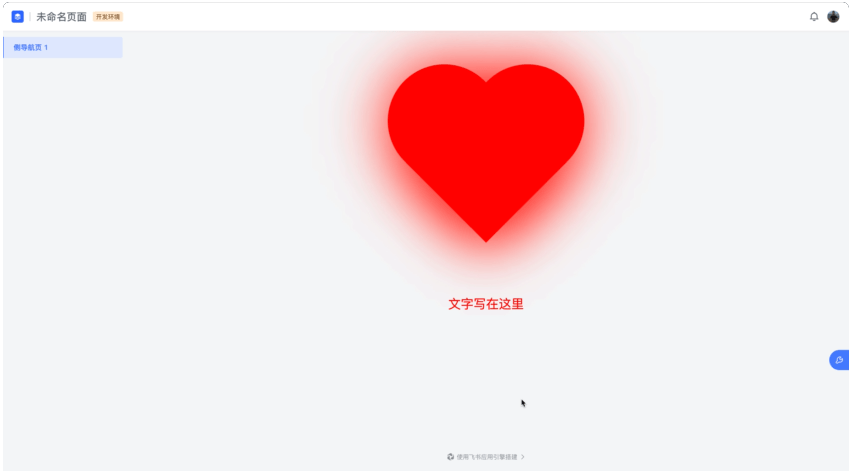
250px|700px|reset
组件限制:
- JS 代码仅支持写在 <script> 标签中
- 不支持引入第三方包,仅支持基于平台提供的官方 SDK 及部分 Web APIs 进行开发
同时,不建议复制粘贴大量第三方库源码作为 HTML 组件的代码。
支持的标签及属性
- 标签
- 属性
除以下内容外,其余均支持
- 不支持 <script> 标签中的 src 属性
- 不支持所有事件属性,如 onclick / onload / onkeydown / onkeyup 等
- iframe 标签不支持 srcdoc 属性
- 所有的属性值不支持 javascript: 开头
支持的 SDK 能力
- Web APIs
支持以下 Web 全局变量 & 全局函数,以及所有 Web API 构造类:
支持的 Web 全局变量&全局函数
├── isSecureContext
├── speechSynthesis
├── speechSynthesis
├── atob(data: string)
├── btoa(data: string)
├── clearInterval(handle?: number)
├── clearTimeout(handle?: number)
├── createImageBitmap(image: ImageBitmapSource, options?: ImageBitmapOptions)
├── createImageBitmap(image: ImageBitmapSource, sx: number, sy: number, sw: number, sh: number, options?: ImageBitmapOptions)
├── fetch(input: RequestInfo, init?: RequestInit)
├── setInterval(handler: TimerHandler, timeout?: number, ...arguments: any[])
├── setTimeout(handler: TimerHandler, timeout?: number, ...arguments: any[])
├── getComputedStyle(elt: Element, pseudoElt?: string | null)
├── getSelection()
├── matchMedia(query: string)
├── requestIdleCallback(callback: IdleRequestCallback, options?: IdleRequestOptions)
├── cancelIdleCallback(handle: number)
├── cancelAnimationFrame(handle: number)
├── requestAnimationFrame(callback: FrameRequestCallback)
使用示例
<script>
// 全局变量
console.log('isSecureContext', isSecureContext);
console.log('speechSynthesis', speechSynthesis);
// 全局函数
setTimeout(()=>{
console.log("定时器")
}, 2000);
</script>
支持以下 Document APIs :
- 属性类
- 方法类
- 事件类
使用示例
<div id="htmlNode">HTML组件示例</div>
<script>
// Document 属性
console.log('docType', document.docType);
console.log('location', document.location);
// Document 方法
const node = document.getElementById("htmlNode");
console.log("node", node);
// GlobalEventHandlers类方案可挂在在任意HTML节点上
const htmlNode = document.getElementById("htmlNode");
htmlNode.onclick = ()=>{
console.log("触发点击事件")
}
</script>
- 平台 SDK
在 HTML 组件内,提供了两个全局工具对象模块:application 、context 可供调用。
2.1 context
上下文对象,可通过此对象获取上下文相关变量的信息,其结构与类型如下所示:
.context
├── app # 当前租户信息
│ ├── apiName # 应用唯一标识
│ ├── namespace # 命名空间
│ ├── label # 应用名称
│ ├── createdAt # 创建时间
│ ├── createdBy # 创建人
│ ├── updatedAt # 更新时间
│ └── updatedBy # 更新人
│
├── currentUser # 当前用户信息
│ ├── id # 当前用户id
│ └── name # 当前用户名
│
├── page # 当前页面信息
│ ├── label # 页面名称
│ ├── apiName # 页面唯一标识
│ ├── description # 页面描述
│ ├── getComponentById # 获取组件id
│ ├── setVar # 设置页面变量
│ └── vars # 获取页面变量
│
├── previewing # 当前组件处于设计态还是运行态页面中
│
├── device # 当前设备信息,取值: desktop \ mobile
│
└── tenant # 当前组件所在的租户
├── id # 租户id
├── name # 租户名
├── type # 租户类型
└── createdAt # 创建时间
2.1.1 context.app
类型 | 示例 |
export interface App { apiName: string; label: { language_code: 2052 | 1033; text: string; }[]; createdAt: number | null; createdBy: { id: string; avatar?: Avatar; name: string; i18n_name: { language_code: 2052 | 1033; text: string; }[]; is_deleted: boolean; } | null; namespace:string; updatedAt: number | null; updatedBy: { id: string; avatar?: Avatar; name: string; i18n_name: { language_code: 2052 | 1033; text: string; }[]; is_deleted: boolean; } | null; } | { "apiName":"app_aadeie55ffka4", "label":[ { "language_code":1033, "text":"Untitled Page" }, { "language_code":2052, "text":"未命名页面" } ], "createdAt":1655724687593, "createdBy":{ "id":1734304581650468, "name":"张一一", "avatar":{ "source":"image", "image": null, "color":null, "content":null, "color_id":null } }, "namespace":"package_51d8b6__c", "updatedAt":1655785746111, "updatedBy":{ "id":1734304581650468, "name":"张一一", "avatar":{ "source":"image", "image":null, "color":null, "content":null, "color_id":null } } } |
2.1.2 context.currentUser
类型 | 示例 |
export interface CurrentUser { id: string; name: { language_code: 2052 | 1033; text: string; }[]; } | { "id":"1734304581650468", "name":[ { "language_code":1033, "text":"Weiren Fan" }, { "language_code":2052, "text":"张一一" } ] } |
2.1.3 context.device
类型 | 示例 |
export interface CurrentUser { device: string; } | { "device":"desktop", } |
2.1.4 context.page
当前页面信息,作用范围是同一个页面里的组件信息共享,例如可以共享页面变量
类型 | 示例 |
export interface Page { label: Partial<{ zh_CN: string; en_US: string; }>; apiName: string; description?: Partial<{ zh_CN: string; en_US: string; }>; getComponentById: <T extends Record<string, any>>(id: string) => ComponentRef<T> | undefined; setVar: (varApi: string, value: any) => void; Vars: Record<string, any> } | { "label":{ "zh_CN":"未命名页面", "en_US":"Untitled Page" }, "apiName":"aadeie55ffka4", "description":[{ "language_code": 2052, "text":"" }] "vars":{ "_currentUser":1734304581650468 } } |
2.1.5 context.previewing
当前组件处于设计态还是运行态,设计态该值为 true,运行态则为 false
2.1.6 context.tenant
当前租户信息
类型 | 示例 |
export interface Tenant { id: number; name: string; type: number; createdAt: number; } | { "name":"apaasdemo-dev803", "id":24600, "type":4, "createdAt":1653965438000, } |
2.2 application
全局对象,可通过此对象模块实现数据请求,调用流程、云函数,获取全局变量,获取多语文案,页面跳转等。
.application
├── data # 数据处理
│
├── func # 云函数调用
│
├── flow # 流程调用
│
├── globalVar # 获取全局变量
│
├── i18n # 多语文案
│
└── navigation # 页面跳转
2.2.1 application.data
<button>Hello world! html</button>
<script>
const objName = "object_ceshi"
// objectDescribe 获取对象定义详情数据
console.log("objectDescribe:", await application.data.objectDescribe(objName, ["*"]))
// createRecord 创建一条数据
const data = {
text: "html-create",
number: 123,
};
var createRecordres = await application.data.createRecord({
objectApiName: objName,
recordData: data,
useApiID: false
})
console.log("createRecord", createRecordres)
// deleteRecord 删除一条数据
let id1 = await application.data.createRecord({
objectApiName: objName,
recordData: {
text: "dxsdk-创建",
number: 1234
}
})
console.log("被创建将被删除", id1)
let res3 = await application.data.deleteRecord({
objectApiName: objName,
recordId: id1
})
console.log("删除结果:", res3)
// updateRecord 更新一条数据
await application.data.updateRecord({
objectApiName: objName,
recordId: createRecordres,
recordData: {
text: "dxsdk-gengxin"
}
})
// batchUpdateRecords 批量更新数据
let id2 = await application.data.createRecord({
objectApiName: objName,
recordData: {
text: "dxsdk-创建"
}
})
let id3 = await application.data.createRecord({
objectApiName: objName,
recordData: {
text: "dxsdk-创建"
}
})
let res = await application.data.batchUpdateRecords({
objectApiName: objName,
data: [{
id: id2,
data: {
text: "dxsdk-批量更新"
}
}, {
id: id3,
data: {
text: "dasdk-批量更新"
}
}]
})
console.log("批量更新结果batchUpdateRecords:", res)
// getRecord 查询一条数据
console.log("getRecord", await application.data.getRecord({
objectApiName: objName,
recordId: createRecordres,
fields: ["*"]
}))
// searchRecords 查询多条记录
let res1 = await application.data.searchRecords(objName, {
filter: {
text: {
contains: "批量更新"
}
},
limit: 10,
sort: "_id+"
})
console.log("searchRecords查询多个记录:", res1)
// 使用 aql 查询
var aqldata = {
dataSource: {
type: 'object',
"source": [{
"source": "student_score",
"alias": "student_score"
},
{
"source": "student_diopter",
"alias": "student_diopter"
}
]
},
join: [
[
'student_score.time',
'student_diopter.time'
],
[
'student_score.name',
'student_diopter.name'
]
],
dimensions: [{
field: 'student_score.name',
function: ''
},
{
field: 'student_score.time',
function: 'DateFormat(yyyy)'
}
],
measures: [{
alias: 'm1',
field: 'Max(student_diopter.diopter)'
},
{
alias: 'm2',
field: 'Sum(student_score.score)'
},
{
alias: 'm3',
field: 'Window(DiffValue(m2,Before)along(student_score.name))'
}
],
filter: {
student_diopter: {
conditions: [{
name: {
equals: '张三'
}
},
{
name: {
equals: '李四'
}
}
],
logic: '1 or 2'
},
student_score: {
conditions: [{
name: {
equals: '张三'
}
},
{
name: {
equals: '李四'
}
}
],
logic: '1 or 2'
}
}
}
var aqlres = await application.data.aql(aqldata)
console.log("data.aql", aqlres)
// downloadFile 下载文件
application.data.downloadFile("29d3bb46e4964669a0982255637c0af8", {
name: 'fileTest',
onFail: (error) => {
console.error('down onFail', error);
},
onSuccess: ({
md5
}) => {
console.log('down onSuccess', md5);
},
onProgress: (percentage) => {
console.log('down onProgress', percentage);
},
})
// uploadFile 上传文件
var file = new File(["foobar"], "p.jpg")
var uploadfileres = await application.data.uploadFile(file, {
ttl: 0,
onFail: (error) => {
console.error('up onFail', error);
},
onSuccess: (data) => {
console.log('up onSuccess file', data.file);
console.log('up onSuccess tempFilePreviewUrl', data.tempFilePreviewUrl);
},
onProgress: (percentage) => {
console.log('up onProgress', percentage);
},
})
</script>
2.2.2 application.func
<button>Hello world! html</button><script> // 执行一个云函数 var funcres = await application.func.invokeFunction("sdkfunc", { a: "nihao" }) console.log("func.invokeFunction", funcres)</script>>>>>
2.2.3 application.flow
<div id="htmlNode">123</div>
<script>
// startExecution 触发直接运行流程
var startExecutionres = await application.flow.startExecution("sdkflow",{params:{textinput:"sdkflow入参"}})
console.log("flow.startExecution",startExecutionres)
// getExecutionInfo 查询流程状态
var getExecutionInfores =await application.flow.getExecutionInfo(startExecutionres.executionId)
console.log("flow.getExecutionInfo",getExecutionInfores)
// revokeExecution 撤销流程
await application.flow.revokeExecution(startExecutionres.executionId,{reason:{zh_CN:"chexiao",en_US:"revoke"}})
// getExecutionList 获取流程列表
var getExecutionListres = await application.flow.getExecutionList({limit:10,offset:0,})
console.log("flow.getExecutionList",getExecutionListres)
// getExecutionParams 获取流程出入参信息
var getExecutionParamsres = await application.flow.getExecutionParams("sdkflow")
console.log("flow.getExecutionParams",getExecutionParamsres)
</script>
2.2.4 application.globalVar
此方法为获取全局变量(详见:@byted-apaas/global-variable ),页面变量通过上文 context.page.vars 获取(详见:HTML组件开发指南-context.page )。
<div>123</div>
<script>
// describe 获取非加密全局变量的描述
var describeres = await application.globalVar.describe("globalParam1")
console.log("globalVar.describe", describeres)
// getValue 获取非加密全局变量的值
var getValueres = await application.globalVar.getValue("globalParam1")
console.log("globalVar.getValue", getValueres)
</script>
2.2.5 application.i18n
<div id="htmlNode">123</div>
<script>
// getCurrentLocale 获取当前语言环境
console.log("i18n.getCurrentLocale", await application.i18n.getCurrentLocale())
// translate 获取翻译文案
console.log("i18n.translate", await application.i18n.translate({
zh_CN: "中文",
en_US: "english"
}))
</script>
2.2.6 application.navigation
<div id="htmlNode">123</div>
<script>
await application.navigation.openPage("appPage_1", {
target: "blank",
navId: "nav_pane_96fap159tt7",
tabId: "tab_lj2qufx0",
pageVars: [{
variableApiName: "var_bitian",
value: "bitianma"
}],
params: {
"aaa": "aaavalue"
}
})
</script>
支持的 UI 样式类
HTML 组件内置了一些样式,比如文本样式、图片样式、按钮样式,开发者可通过 class 引用,详细 class 列表如下:
分类 | 样式说明 | 使用方式及类名 | 效果示例 |
文本 | 普通文本 | <p class="app-engine-text"> 普通文本 </p> | 250px|700px|reset |
| 禁用文本 | <p class="app-engine-text-disabled"> 禁用 </p> | |
| 引导文本 | <p class="app-engine-text-placeholder"> 引导 </p> | |
| 告警文本 | <p class="app-engine-text-danger"> 告警 </p> | |
| 信息文本 | <p class="app-engine-text-info"> 信息 </p> | |
图片 | 圆角图片 | <img src="..." class="app-engine-img-rounded"> | 250px|700px|reset |
| 圆形图片 | <img src="..." class="app-engine-img-circle"> | |
button | 主要按钮 | <button class="app-engine-btn-primary" ... >...</button> | 250px|700px|reset |
| 次要按钮 | <button class="app-engine-btn-secondary" ... >...</button> | |
| 文字按钮 | <button class="app-engine-btn-text" ... >...</button> | |
常见问题(FAQ)
1.为 buttion 标签配置 onclick 事件属性时为何报错?
JS 脚本仅支持在 script 标签中编写,不再支持在常规标签中编写 onclick 等属性。如果需要给 DOM 绑定事件,可用 element.onclick = handlerFunc 或 element.addEventListener("click", handlerFunc) 中的任意一种写法。
2.为什么在设计态我的 js 代码没有执行?
推荐阅读